Написание пользовательской документации — отдельный фронт работ, он более или менее независим от процесса разработки — главное, чтобы она дошла хоть до какой-то тестовой эксплуатации.
Самым популярным на сегодня инструментом документирования является
Sphinx; в нашем проекте косвенно задействован другой —
Perl Podlators — с его помощью форматируется man-страница. Внутреннее документирование мы организуем с помощью ещё одной классической системы —
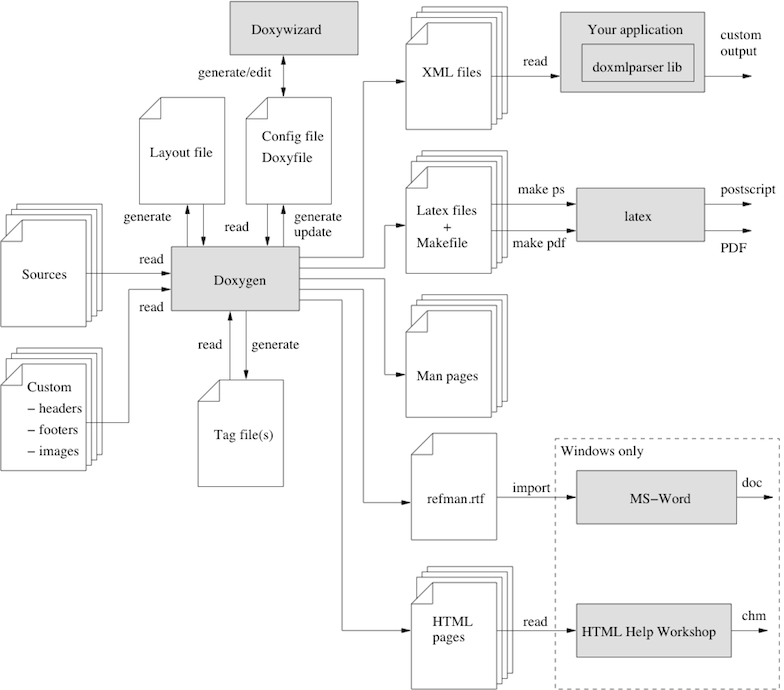
Doxygen. Процесс создания документации с её помощью поддерживается Autotools, при этом доступно немалое количество выходных форматов документации — от HTML-страницы до печатного варианта:
Добавим в проект поддержку doxygen:
.
├── configure.ac
├── doc
│   ├── Makefile.am
│   └── syscall.pod
├── LICENSE
├── Makefile.am
├── src
│   ├── basic.c
│   ├── globals.c
│   ├── lssyscalls
│   ├── Makefile.am
│   ├── syscall.c
│   ├── syscall.h
│   └── utility.c
└── tests
   ├── include.ts
   ├── Makefile.am
   └── upstream.ts
Для описания параметров документирования используется базовый шаблонный файл Doxyfile.in, генерируемый командой:
@user
[user@VM syscall-master]$ doxygen -g Doxyfile.in
Файл представляет собой тщательно откомментированный перечень свойств будущей документации:
@user:
syscall-master/Doxyfile.in
#---------------------------------------------------------------------------
# Project related configuration options
#---------------------------------------------------------------------------

# This tag specifies the encoding used for all characters in the configuration
# file that follow. The default is UTF-8 which is also the encoding used for all
# text before the first occurrence of this tag. Doxygen uses libiconv (or the
# iconv built into libc) for the transcoding. See
# https://www.gnu.org/software/libiconv/ for the list of possible encodings.
# The default value is: UTF-8.

DOXYFILE_ENCODING      = UTF-8

# The PROJECT_NAME tag is a single word (or a sequence of words surrounded by
# double-quotes, unless you are using Doxywizard) that should identify the
# project for which the documentation is generated. This name is used in the
# title of most generated pages and in a few other places.
# The default value is: My Project.

PROJECT_NAME           = "My Project"

# The PROJECT_NUMBER tag can be used to enter a project or revision number. This
# could be handy for archiving the generated documentation or if some version
# control system is used.

PROJECT_NUMBER         =
Поменяем основные параметры:
@user:
syscall-master/Doxyfile.in
diff --git a/Doxyfile.in b/Doxyfile.in
index a822940..29071c4 100644
--- a/Doxyfile.in
+++ b/Doxyfile.in
@@ -42,13 +42,13 @@ DOXYFILE_ENCODING      = UTF-8
# title of most generated pages and in a few other places.
# The default value is: My Project.

-PROJECT_NAME           = "My Project"
+PROJECT_NAME           = "@PACKAGE_TARNAME@"

# The PROJECT_NUMBER tag can be used to enter a project or revision number. This
# could be handy for archiving the generated documentation or if some version
# control system is used.

-PROJECT_NUMBER         =
+PROJECT_NUMBER         = @PACKAGE_VERSION@

# Using the PROJECT_BRIEF tag one can provide an optional one line description
# for a project that appears at the top of each page and should give viewer a
@@ -54,7 +54,7 @@ PROJECT_NUMBER         = @PACKAGE_VERSION@
# for a project that appears at the top of each page and should give viewer a
# quick idea about the purpose of the project. Keep the description short.

-PROJECT_BRIEF          =
+PROJECT_BRIEF          = "@PACKAGE_NAME@"

# With the PROJECT_LOGO tag one can specify a logo or an icon that is included
# in the documentation. The maximum height of the logo should not exceed 55
@@ -74,7 +74,7 @@ PROJECT_ICON           =
# entered, it will be relative to the location where doxygen was started. If
# left blank the current directory will be used.

-OUTPUT_DIRECTORY       =
+OUTPUT_DIRECTORY       = @DX_DOCDIR@

# If the CREATE_SUBDIRS tag is set to YES then doxygen will create up to 4096
# sub-directories (in 2 levels) under the output directory of each output format
@@ -215,7 +215,7 @@ SHORT_NAMES            = NO
# description.)
# The default value is: NO.

-JAVADOC_AUTOBRIEF      = NO
+JAVADOC_AUTOBRIEF      = YES

# If the JAVADOC_BANNER tag is set to YES then doxygen will interpret a line
# such as
@@ -297,7 +297,7 @@ ALIASES                =
# members will be omitted, etc.
# The default value is: NO.

-OPTIMIZE_OUTPUT_FOR_C  = NO
+OPTIMIZE_OUTPUT_FOR_C  = C

# Set the OPTIMIZE_OUTPUT_JAVA tag to YES if your project consists of Java or
# Python sources only. Doxygen will then generate output that is more tailored
@@ -524,31 +524,31 @@ TIMESTAMP              = NO
# normally produced when WARNINGS is set to YES.
# The default value is: NO.

-EXTRACT_ALL            = NO
+EXTRACT_ALL            = YES

# If the EXTRACT_PRIVATE tag is set to YES, all private members of a class will
# be included in the documentation.
# The default value is: NO.
 -EXTRACT_PRIVATE        = NO
+EXTRACT_PRIVATE        = YES

# If the EXTRACT_PRIV_VIRTUAL tag is set to YES, documented private virtual
# methods of a class will be included in the documentation.
# The default value is: NO.

-EXTRACT_PRIV_VIRTUAL   = NO
+EXTRACT_PRIV_VIRTUAL   = YES

# If the EXTRACT_PACKAGE tag is set to YES, all members with package or internal
# scope will be included in the documentation.
# The default value is: NO.

-EXTRACT_PACKAGE        = NO
+EXTRACT_PACKAGE        = YES

# If the EXTRACT_STATIC tag is set to YES, all static members of a file will be
# included in the documentation.
# The default value is: NO.

-EXTRACT_STATIC         = NO
+EXTRACT_STATIC         = YES

# If the EXTRACT_LOCAL_CLASSES tag is set to YES, classes (and structs) defined
# locally in source files will be included in the documentation. If set to NO,
@@ -564,7 +564,7 @@ EXTRACT_LOCAL_CLASSES  = YES
# included.
# The default value is: NO.

-EXTRACT_LOCAL_METHODS  = NO
+EXTRACT_LOCAL_METHODS  = YES

# If this flag is set to YES, the members of anonymous namespaces will be
# extracted and appear in the documentation as a namespace called
@@ -949,7 +949,7 @@ WARN_LOGFILE           =
# spaces. See also FILE_PATTERNS and EXTENSION_MAPPING
# Note: If this tag is empty the current directory is searched.

-INPUT                  =
+INPUT                  = @top_srcdir@/src

# This tag can be used to specify the character encoding of the source files
# that doxygen parses. Internally doxygen uses the UTF-8 encoding. Doxygen uses
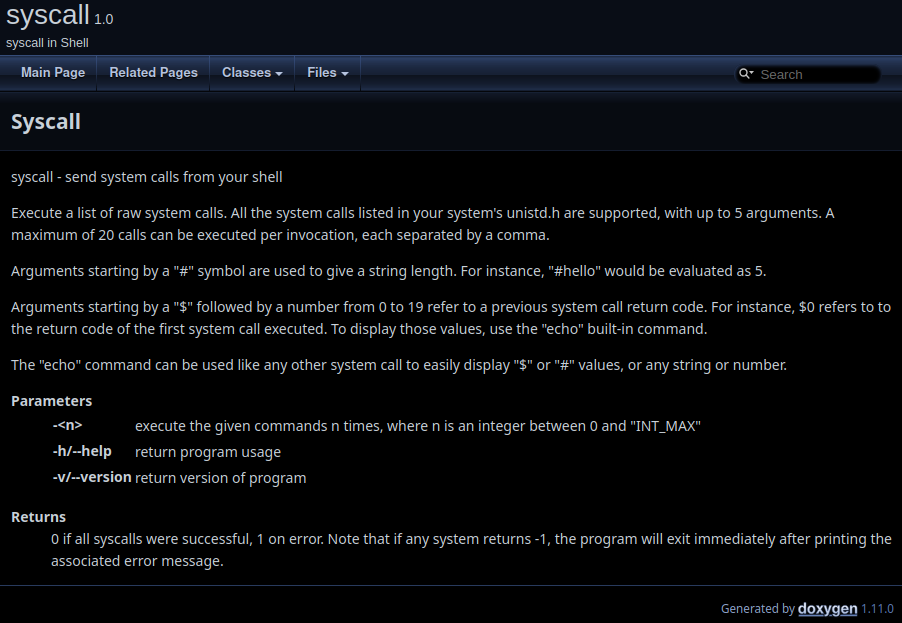
Самодокументирование представляет собой комментирование исходников, которое и уйдёт в документацию. Doxygen поддерживает как однострочные, так и многострочные комментарии, при чём вне зависимости от формата документирования в разных языках программирования. Ключевые слова, отмеченные символом @ позволяют описывать в документации основные компоненты программы, а также определять разделы (как, например, ключевое слово @mainpage для размещения текста на главной странице документации):
@user:
syscall-master/src/syscall.c
/** @mainpage Syscall
* syscall - send system calls from your shell
*
* Execute a list of raw system calls. All the system calls listed in your system's unistd.h are
* supported, with up to 5 arguments. A maximum of 20 calls can be executed per invocation, each
* separated by a comma.
*
* Arguments starting by a "#" symbol are used to give a string length. For instance, "#hello"
* would be evaluated as 5.
*
* Arguments starting by a "$" followed by a number from 0 to 19 refer to a previous system call
* return code. For instance, $0 refers to to the return code of the first system call executed.
* To display those values, use the "echo" built-in command.
*
* The "echo" command can be used like any other system call to easily display "$" or "#" values,
* or any string or number.
*
* @param -<n> execute the given commands n times, where n is an integer between 0 and "INT_MAX"
* @param -h/--help return program usage
* @param -v/--version return version of program
*
* @return 0 if all syscalls were successful, 1 on error. Note that if any system returns -1,
* the program will exit immediately after printing the associated error message.
*/

#include "syscall.h"
/** Parse input shell-string and execute syscalls
*
* @return 0 if string parsing and syscall's execution were successfully completed, 1 if weren't
*/
int main(int argc, char **argv)
{
 int repeat = 1, skip = 1;

 if (argc <= 1) {
   usage();
   return 0;
 }

 /* arguments */
 if (argv[1][0] == '-') {
   /* help */
   if (streq(argv[1], "-h") || streq(argv[1], "--help")) {
     usage();
     return 0;
   }

   /* version */
   if (streq(argv[1], "-v") || streq(argv[1], "--version")) {
     puts("syscall version "VERSION);
     return 0;
   }

   /* Handle -n option */
   repeat = atoi(argv[1] + 1);
   if (repeat < 1) {
     errx(1, "option -<n> must be between 1 and %d", INT_MAX);
   }
   if (argc <= 3) {
     usage();
     return 1;
   }
   skip++;
 }

 memset(ret_values, -1, sizeof ret_values);

 while (repeat--) {
   split_cmdline(argc - skip, argv + skip);
 }

 return 0;
}
@user:
syscall-master/src/utility.c
/** @page utility
* There are special functions for internal workings of the program
*/

#include "syscall.h"
/** Help-string of program usage
*/
void usage()
{
 puts("usage: syscall [-<n>] name [args...] [, name [args...]]...");
}

/** Syscall`s names comparator
*
* @param m1 first comparing syscall
* @param m2 second comparing syscall
*
* @return comparing result
*/
int scomp(const void *m1, const void *m2)
{
 Syscall *sys1 = (Syscall *)m1;
 Syscall *sys2 = (Syscall *)m2;
 return strcmp(sys1->name, sys2->name);
}

/** Binary search of executing syscall @p name
*
* @param name executing syscall
* @return system code of syscall
*/
long lookup(const char *name)
{
 Syscall key, *res;
 key.name = name;

 res = bsearch(&key, systab, systab_size, sizeof key, scomp);
 if (res == NULL) {
   errx(1, "unknown system call: %s", name);
 }

 return res->code;
}

/** Quick and dirty way to unescape \n at the end of strings
*/
void unescape_nl(char *str) {
 size_t end = strlen(str) - 1;

 while (str[end] == 'n' && str[end-1] == '\\') {
   str[end-1] = '\n';
   str[end] = '\0';
   end -= 2;
 }
}

/** Special debugging function
*/
void dump_ret_values(void) {
 for (int i = 0; i < CMD_MAX; i++) {
   printf("%0d  %d\n", i, ret_values[i]);
 }
}
В configure.ac опишем использование Doxygen, для этого необходимо лишь инициализировать его (при этом указываются имя проекта, путь к файлу настройки и путь к директории, где будет храниться документация) и указать в списке генератов:
@user:
syscall-master/configure.ac
#                                               -*- Autoconf -*-
# Process this file with autoconf to produce a configure script.


AC_INIT([syscall in Shell], [1.0], [UsamG1t], [syscall])
AC_CONFIG_SRCDIR([src/syscall.c])

AM_INIT_AUTOMAKE([foreign subdir-objects])
LT_INIT([disable-static])
AC_CONFIG_HEADERS([config.h])

DX_INIT_DOXYGEN([syscall], [Doxyfile], [doxygen-doc])

# Checks for programs.
<...>
AC_CONFIG_FILES([Makefile src/Makefile doc/Makefile tests/Makefile Doxyfile])
AC_OUTPUT
В spec-файле все необходимые для документации пакеты должны быть занесены в BuildRequires:
Для установки документации при установке пакета в директиву %files необходимо указать зависимость на данные в директории документации:
@user:
syscall-master/.gear/syscall.spec
<...>
# Automatically added by buildreq on Fri Aug 08 2025
# optimized out: glibc-kernheaders-generic glibc-kernheaders-x86 gnu-config libgpg-error perl perl-Encode perl-Pod-Escapes perl-Pod-Simple perl-parent perl-podlators sh5
BuildRequires: perl-Pod-Usage check libcheck-devel doxygen graphviz autoconf-archive

<...>

%files
%_bindir/%name
%_libdir/*
%_docdir/*
%_man1dir/*

%changelog
* Tue Aug 12 2025 UsamG1t <usamg1t@altlinux.org> 1.3-alt1
- Add Doxygen

* Mon Aug 11 2025 UsamG1t <usamg1t@altlinux.org> 1.2-alt1
- Add gcov

* Fri Aug 08 2025 UsamG1t <usamg1t@altlinux.org> 1.1-alt1
- Add xUnit check

* Fri Aug 08 2025 UsamG1t <usamg1t@altlinux.org> 1.0-alt1
- Initial Build
Итоговый вид директорий проекта с документацией выглядит так:
.
├── configure.ac
├── doc
│   ├── Makefile.am
│   └── syscall.pod
├── Doxyfile.in
├── LICENSE
├── Makefile.am
├── src
│   ├── basic.c
│   ├── globals.c
│   ├── lssyscalls
│   ├── Makefile.am
│   ├── syscall.c
│   ├── syscall.h
│   └── utility.c
└── tests
   ├── include.ts
   ├── Makefile.am
   └── upstream.ts
@user
[user@VM syscall-master]$ gear-hsh --lazy
<...>
Wrote: /usr/src/in/srpm/syscall-1.3-alt1.src.rpm (w1.gzdio)
Installing syscall-1.3-alt1.src.rpm
<...>
SRCDIR='.' PROJECT='syscall' VERSION='1.0' PERL_PATH='/usr/bin/perl' HAVE_DOT='NO' GENERATE_MAN='NO' GENERATE_RTF='NO' GENERATE_XML='NO' GENERATE_HTMLHELP='NO' GENERATE_CHI='NO' GENERATE_HTML='YES' GENERATE_LAT
EX='NO' DOCDIR=doxygen-doc /usr/bin/doxygen Doxyfile
<...>
finished...
echo Timestamp >doxygen-doc/syscall.tag
<...>
Wrote: /usr/src/RPM/SRPMS/syscall-1.3-alt1.src.rpm (w2.lzdio)
Wrote: /usr/src/RPM/RPMS/x86_64/syscall-1.3-alt1.x86_64.rpm (w2.lzdio)
Wrote: /usr/src/RPM/RPMS/x86_64/syscall-debuginfo-1.3-alt1.x86_64.rpm (w2.lzdio)
@rooter
[user@VM syscall-master]$ hsh-shell --rooter
[root@localhost .in]# rpm -i syscall-1.3-alt1.x86_64.rpm
<13>Aug 12 11:39:55 rpm: syscall-1.3-alt1 1754998745 installed

[root@localhost .in]# ls /usr/share/doc/syscall/html/
annotated.html                             doc.svg             functions_vars.html   graph_legend.png  navtree.css                 syscall_8c.html            systab_8h.html            tab_sd.png
basic_8c.html                              docd.svg            globals.html          index.html        open.png                    syscall_8c__incl.map       systab_8h__dep__incl.map  tabs.css
basic_8c__incl.map                         doxygen.css         globals_8c.html       jquery.js         plus.svg                    syscall_8c__incl.md5       systab_8h__dep__incl.md5  utility_8c.html
basic_8c__incl.md5                         doxygen.svg         globals_8c__incl.map  menu.js           plusd.svg                   syscall_8c__incl.png       systab_8h__dep__incl.png  utility_8c__incl.map
basic_8c__incl.png                         doxygen_crawl.html  globals_8c__incl.md5  menudata.js       resize.js                   syscall_8h.html            systab_8h_source.html     utility_8c__incl.md5
bc_s.png                                   dynsections.js      globals_8c__incl.png  minus.svg         search                      syscall_8h__dep__incl.map  tab_a.png                 utility_8c__incl.png
bc_sd.png                                  files.html          globals_defs.html     minusd.svg        splitbar.png                syscall_8h__dep__incl.md5  tab_ad.png
classes.html                               folderclosed.svg    globals_func.html     nav_f.png         splitbard.png               syscall_8h__dep__incl.png  tab_b.png
clipboard.js                               folderclosedd.svg   globals_type.html     nav_fd.png        structsyscall-members.html  syscall_8h__incl.map       tab_bd.png
closed.png                                 folderopen.svg      globals_vars.html     nav_g.png         structsyscall.html          syscall_8h__incl.md5       tab_h.png
cookie.js                                  folderopend.svg     graph_legend.html     nav_h.png         sync_off.png                syscall_8h__incl.png       tab_hd.png
dir_68267d1309a1af8e8297ef4c3efbcdba.html  functions.html      graph_legend.md5      nav_hd.png        sync_on.png                 syscall_8h_source.html     tab_s.png

[root@localhost .in]#
С помощью Doxygen возможна генерация практически любого формата документации. Для создания дополнительных справочников, например, man, необходимо указать это в настройщике, а также добавить правила генерации в Makefile.am:
@user:
syscall-master/Doxyfile.in
diff --git a/Doxyfile.in b/Doxyfile.in
index d097c79..aa9f764 100644
--- a/Doxyfile.in
+++ b/Doxyfile.in
@@ -2204,7 +2204,7 @@ RTF_EXTRA_FILES        =
# classes and files.
# The default value is: NO.

-GENERATE_MAN           = NO
+GENERATE_MAN           = YES

# The MAN_OUTPUT tag is used to specify where the man pages will be put. If a
# relative path is entered the value of OUTPUT_DIRECTORY will be put in front of
lines 1-13/13 (END)
Поскольку Autotools умеет генерировать рецепты для сборки man, необходимо лишь указать путь, где должна будет храниться страница с документацией:
@user:
syscall-master/Makefile.am
SUBDIRS = src doc tests

@DX_RULES@

all-local:      doxygen-doc

doxygen-doc/man/man3/syscall.h.3: doxygen-doc

man3_MANS = doxygen-doc/man/man3/syscall.h.3

checklog:       check
       cat tests/*.log

gcov:   check
       $(MAKE) -C src gcov

http:   doxygen-doc
       python3 -m http.server --directory $</html
...<Building PKG>...
@rooter
[user@VM syscall-master]$ hsh-shell --rooter
[root@localhost .in]# rpm -i syscall-1.3-alt1.x86_64.rpm
<13>Aug 12 12:09:43 rpm: syscall-1.3-alt1 1754998745 installed

[root@localhost .in]# ls /usr/share/man/man1/syscall.1.xz
/usr/share/man/man1/syscall.1.xz
[root@localhost .in]# ls /usr/share/man/man3/syscall.h.3.xz
/usr/share/man/man3/syscall.h.3.xz
[root@localhost .in]#
/usr/share/man/man3/syscall.h.3.xz
src/syscall.h(3)                                        Library Functions Manual                                        src/syscall.h(3)

NAME
      src/syscall.h

SYNOPSIS
      #include <err.h>
      #include <errno.h>
      #include <limits.h>
      #include <stdio.h>
      #include <stdlib.h>
      #include <string.h>
      #include <unistd.h>

  Classes
      struct syscall

  Macros
      #define _DEFAULT_SOURCE
      #define VERSION   'unknown'
      #define streq(a,  b)   (strcmp(a,b) == 0)
      #define ARG(n)   parse_arg(syscall_name, cmd[n])
      #define CMD_MAX   20  /* maximum number of commands per invocation */

  Typedefs
      typedef struct syscall Syscall

  Functions
      void usage ()
          Help-string of program usage.
      int scomp (const void *m1, const void *m2)
          Syscall`s names comparator.
      long lookup (const char *name)
          Binary search of executing syscall name.
      void unescape_nl (char *str)
          Quick and dirty way to unescape
           at the end of strings. "
      void dump_ret_values (void)
          Special debugging function.
      void echo (int argc, char **argv)
          Info syscall for input data presentation.
      unsigned long parse_arg (const char *syscall_name, char *arg)
          Argument Parser.
      void parse_syscall (int cmd_no, char **cmd, int cmd_len)
          Search and Execute syscall with fix number of args.
      void split_cmdline (int argc, char **argv)
          Parse input to groups <<syscall + fix number of args>> and execute syscalls.

  Variables
      int ret_values [CMD_MAX]
      Syscall systab []
      int systab_size

Macro Definition Documentation
  #define _DEFAULT_SOURCE
  #define ARG( n)   parse_arg(syscall_name, cmd[n])
  #define CMD_MAX   20  /* maximum number of commands per invocation */
  #define streq( a,  b)   (strcmp(a,b) == 0)
  #define VERSION   'unknown'
Typedef Documentation
  typedef struct syscall Syscall
Function Documentation
  void dump_ret_values (void )
      Special debugging function.

  void echo (int argc, char ** argv)
      Info syscall for input data presentation.

      Returns
          input shell-string with parsed arguments

  long lookup (const char * name)
      Binary search of executing syscall name.

      Parameters
          name executing syscall

      Returns
          system code of syscall

  unsigned long parse_arg (const char * syscall_name, char * arg)
      Argument Parser.

      Parameters
          syscall_name syscall to which the argument belongs
          arg argument which need to be parsed:

          o #<word> for length of a string

          o $<number> for return values of a previous syscalls

          o <number> for a number

          o <word> for a string

      Returns
          parsing value depending on input

  void parse_syscall (int cmd_no, char ** cmd, int cmd_len)
      Search and Execute syscall with fix number of args.

      Parameters
          cmd_no number of syscall
          cmd syscall text pointer
          cmd_len length of arguments of syscall

  int scomp (const void * m1, const void * m2)
      Syscall`s names comparator.

      Parameters
          m1 first comparing syscall
          m2 second comparing syscall

      Returns
          comparing result

  void split_cmdline (int argc, char ** argv)
      Parse input to groups <<syscall + fix number of args>> and execute syscalls.

      Parameters
          argc length of shell-string (words)
          argv input shell-string

  void unescape_nl (char * str)
      Quick and dirty way to unescape
       at the end of strings.

  void usage ()
      Help-string of program usage.

Variable Documentation
  int ret_values[CMD_MAX] [extern]
  Syscall systab[] [extern]
  int systab_size [extern]
Author
      Generated automatically by Doxygen for syscall from the source code.

syscall                                        Version 1.0                                        src/syscall.h(3)