

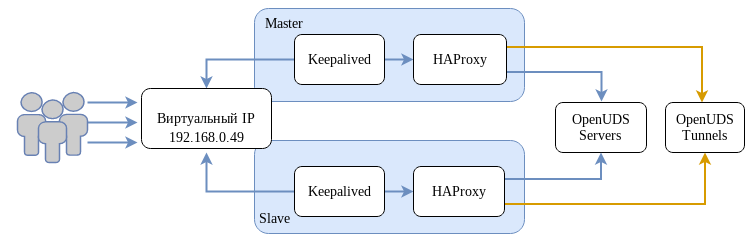
# openssl req -x509 -nodes -days 3650 -newkey rsa:2048 -keyout /root/ssl.key -out /root/ssl.crt
/etc/openssl/private):
# cat /root/ssl.crt /root/ssl.key > /etc/openssl/private/haproxy.pem
Примечание
/etc/openssl/private на вторичном сервере. Если используется собственный сертификат, его необходимо скопировать на оба сервера (основной и дополнительный).
Важно
# apt-get install haproxy keepalived
/etc/haproxy/haproxy.cfg следующим:
global
        log /dev/log    local0
        log /dev/log    local1 notice
        chroot /var/lib/haproxy
        stats socket /var/lib/haproxy/admin.sock mode 660 level admin
        stats timeout 30s
        maxconn 2048
        user _haproxy
        group _haproxy
        daemon

        # Default SSL material locations
        # ca-base /etc/openssl/certs
        # crt-base /etc/openssl/private

        # Default ciphers to use on SSL-enabled listening sockets.
        # For more information, see ciphers(1SSL). This list is from:
        #  https://hynek.me/articles/hardening-your-web-servers-ssl-ciphers/
        ssl-default-bind-options ssl-min-ver TLSv1.2 prefer-client-ciphers
        # ssl-default-bind-ciphersuites TLS_AES_128_GCM_SHA267:TLS_AES_267_GCM_SHA384:TLS_CHACHA20_POLY1305_SHA267
        ssl-default-bind-ciphers ECDH+AESGCM:ECDH+CHACHA20:ECDH+AES267:ECDH+AES128:!aNULL:!SHA1:!AESCCM

        # ssl-default-server-options ssl-min-ver TLSv1.2
        # ssl-default-server-ciphersuites TLS_AES_128_GCM_SHA267:TLS_AES_267_GCM_SHA384:TLS_CHACHA20_POLY1305_SHA267
        # ssl-default-server-ciphers ECDH+AESGCM:ECDH+CHACHA20:ECDH+AES267:ECDH+AES128:!aNULL:!SHA1:!AESCCM

       tune.ssl.default-dh-param 2048


defaults
        log     global
        mode    http
        option  httplog
        option  dontlognull
        option  forwardfor
        retries 3
        option  redispatch

        stats enable
        stats uri /haproxystats
        stats realm Strictly\ Private
        stats auth stats:haproxystats

        timeout connect 5000
        timeout client  50000
        timeout server  50000

frontend http-in
        bind *:80
        mode http
        http-request set-header X-Forwarded-Proto http
        default_backend openuds-backend
frontend https-in
        bind *:443 ssl crt /etc/openssl/private/haproxy.pem
        mode http
        http-request set-header X-Forwarded-Proto https
        default_backend openuds-backend

frontend tunnel-in
        bind *:1443
        mode tcp
        option tcplog
        default_backend tunnel-backend-ssl

frontend tunnel-in-guacamole    # HTML5
        bind *:10443
        mode tcp
        option tcplog
        default_backend tunnel-backend-guacamole
backend openuds-backend
        option http-keep-alive
        balance roundrobin
        server udss1 192.168.0.85:80 check inter 2000 rise 2 fall 5
        server udss2 192.168.0.86:80 check inter 2000 rise 2 fall 5
backend tunnel-backend-ssl
        mode tcp
        option tcplog
        balance roundrobin
        server udst1 192.168.0.87:7777 check inter 2000 rise 2 fall 5
        server udst2 192.168.0.88:7777 check inter 2000 rise 2 fall 5

backend tunnel-backend-guacamole
        mode tcp
        option tcplog
        balance source
        server udstg1 192.168.0.87:10443 check inter 2000 rise 2 fall 5
        server udstg2 192.168.0.88:10443 check inter 2000 rise 2 fall 5
#echo "net.ipv4.ip_nonlocal_bind = 1" >> /etc/sysctl.conf#sysctl -p
/etc/keepalived/keepalived.conf. Содержимое файла зависит от узла, который настраивается:
global_defs {
    # Keepalived process identifier
    lvs_id haproxy_DH
}
# Script used to check if HAProxy is running
vrrp_script check_haproxy {
    script "killall -0 haproxy"
    interval 2
    weight 2
}
# Виртуальный интерфейс
# The priority specifies the order in which the assigned interface to take over in a failover
vrrp_instance VI_01 {
    state MASTER
    interface enp0s3
    virtual_router_id 51
    priority 101
    # Виртуальный IP-адрес
    virtual_ipaddress {
        192.168.0.49
    }
    track_script {
        check_haproxy
    }
}
где enp0s3 — интерфейс, для виртуального IP (узнать имя сетевого интерфейса можно, выполнив команду ip a).
global_defs {
    # Keepalived process identifier
    lvs_id haproxy_DH_passive
}
# Script used to check if HAProxy is running
vrrp_script check_haproxy {
    script "killall -0 haproxy"
    interval 2
    weight 2
}
# Виртуальный интерфейс
# The priority specifies the order in which the assigned interface to take over in a failover
vrrp_instance VI_01 {
    state SLAVE
    interface eth0
    virtual_router_id 51
    priority 100
    # Виртуальный IP-адрес
    virtual_ipaddress {
        192.168.0.49
    }
    track_script {
        check_haproxy
    }
}
где eth0 — интерфейс, для виртуального IP (узнать имя сетевого интерфейса можно, выполнив команду ip a).
#systemctl enable --now haproxy#systemctl enable --now keepalived
$ ip a |grep enp0s3
2: enp0s3: <BROADCAST,MULTICAST,UP,LOWER_UP> mtu 1500 qdisc fq_codel state UP group default qlen 1000
    inet 192.168.0.52/24 brd 192.168.0.255 scope global noprefixroute enp0s3
    inet 192.168.0.49/32 scope global enp0s3